스킬로 돌아가기
mimo2codex
7as0nch 제작
Codex—아직 평가 없음
내 평가
요약
让最新版 OpenAI Codex CLI / Codex 桌面端接入主流大模型的本地代理(新增mac/win包支持,后台运行,开机自动重启)。内置 小米 MiMo V2.5/DeepSeek V4 Pro,并提供通用 provider 机制,**OpenAI Chat Completions 兼容**(Qwen / GLM / Kimi / 本地 vLLM / Ollama / LM Studio …)或**原生 Responses API**(OpenAI 自家)的上游接到新版 Codex。把 Codex 的 Responses API 实时翻译成上游的 Chat Completions API,按客户端发的 `model` 字段在 provider 之间自动路由.
설명
# mimo2codex <p align="center"> <a href="./README.md"><strong>English</strong></a> · <a href="./README.zh.md">简体中文</a> · <a href="https://mimodoc.chengj.online">Docs site</a> </p> <p align="center"> <a href="https://github.com/7as0nch/mimo2codex/stargazers"><img alt="GitHub Stars" src="https://img.shields.io/github/stars/7as0nch/mimo2codex?style=flat-square&logo=github"></a> <a href="https://www.npmjs.com/package/mimo2codex"><img alt="npm version" src="https://img.shields.io/npm/v/mimo2codex?style=flat-square&logo=npm"></a> <a href="https://www.npmjs.com/package/mimo2codex"><img alt="downloads" src="https://img.shields.io/npm/dt/mimo2codex?style=flat-square&color=brightgreen"></a> <img alt="license" src="https://img.shields.io/github/license/7as0nch/mimo2codex?style=flat-square"> <img alt="node" src="https://img.shields.io/badge/Node-18%2B-blue?style=flat-square&logo=node.js&logoColor=white"> <img alt="wire_api" src="https://img.shields.io/badge/wire__api-responses-black?style=flat-square"> <a href="https://paypal.me/7as0nch"><img alt="Sponsor on PayPal" src="https://img.shields.io/badge/Sponsor-PayPal-00457C?style=flat-square&logo=paypal&logoColor=white"></a> </p> Local proxy that lets the **latest OpenAI Codex CLI / desktop** talk to virtually any modern LLM. Built-in support for **Xiaomi MiMo V2.5** and **DeepSeek V4 Pro**, plus a **generic provider mechanism** for any **OpenAI Chat Completions-compatible** (Qwen / GLM / Kimi / vLLM / Ollama / LM Studio …) or **native Responses API** upstream — no code changes, no re-publish. It translates Codex's Responses API ↔ upstream Chat Completions on the fly, routes per-request by the `model` field, and runs on `127.0.0.1`. **Why:** MiMo's official Codex integration only supports `wire_api = "chat"`, which newer Codex versions hard-error on. mimo2codex sits in between, so you keep Codex on latest and it thinks it's talking to a native Responses backend. Conceptually a thin protocol shim — sibling to [openrouter](https://openrouter.ai) / [claude-code-router](https://github.com/musistudio/claude-code-router). ## Three ways to run 1. **CLI** — `npm install -g mimo2codex`. The classic path; full control from the terminal. 2. **Docker** — for intranet / team setups: user login, BYOK, OAuth, downloadable Codex config bundles; the upstream key never leaks. → [Auth & deployment](./doc/auth-deployment.md) 3. **Desktop app** (Windows / macOS, best for non-technical users) — installer, runs in the background, starts on boot; one click from the tray opens the admin UI. → [Download](https://mimodoc.chengj.online/download) 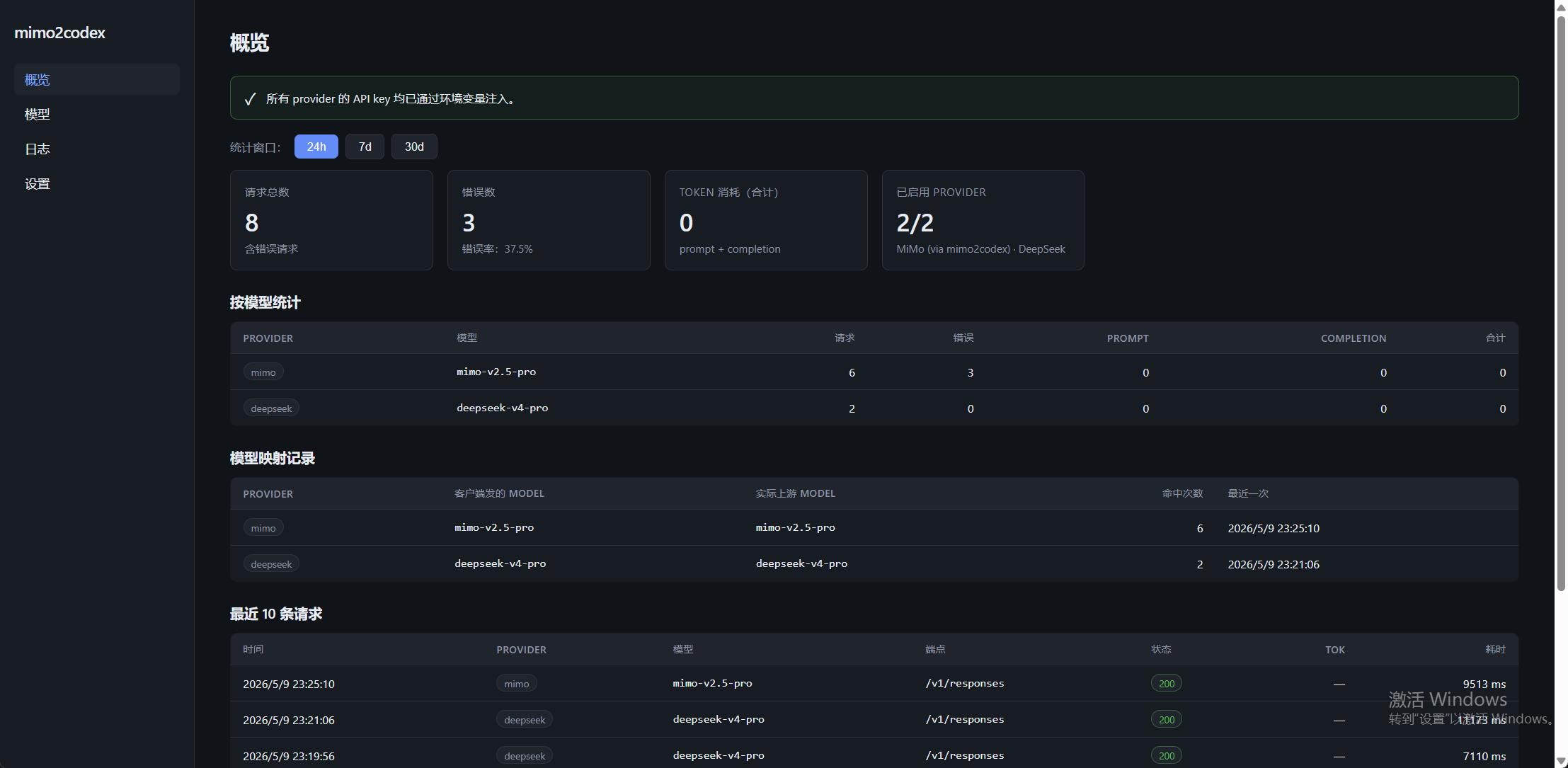 ## What it does - ✅ **Codex CLI (`wire_api = "responses"`) + desktop app** — stay on the latest Codex. - ✅ **Multi-provider in one process** — MiMo + DeepSeek + generic providers, per-request routing by the `model` field. - ✅ **Any OpenAI-compatible / native-Responses upstream** — Qwen / GLM / Kimi / Ollama / OpenAI, declared in `providers.json`. - ✅ **Tool calling, web search, vision, reasoning** — function & parallel tools, MCP namespace; MiMo native `web_search`; correct multi-turn `reasoning_content` round-trip. - ✅ **One-click Codex model switching** from the admin webui (replaces cc-switch). - ✅ **Admin console** at `http://127.0.0.1:8788/admin/` — model catalog, chat logs, token stats, provider config; sqlite persistence. ## Quick start ```bash npm install -g mimo2codex # 1. install (Node ≥ 18) mimo2codex init # 2. add your API key → edit ~/.mimo2codex/.env mimo2codex # 3. start the proxy on 127.0.0.1:8788 ``` Then point Codex at it — one-click on the admin UI's **Codex Enable** page, or copy the printed `config.toml` / `auth.json` into `~/.codex/`. Walkthrough: **[Codex Enable](./doc/codex-enable.md)**. > Keys & per-OS setup → [Env setup](./doc/env-setup.md) · Run Codex CLI in isolation on Windows → [Isolated Codex CLI](./doc/codex-cli-isolated-windows.md) ## Documentation Full docs (searchable, bilingual) live at **<https://mimodoc.chengj.online>**. **Getting started** - [Env setup](./doc/env-setup.md) — set up all keys once; per-OS `.env` loader (macOS / Linux / Windows) - [Codex Enable](./doc/codex-enable.md) — one-click model switching in the webui (replaces cc-switch) - [Isolated Windows Codex CLI](./doc/codex-cli-isolated-windows.md) — let Codex CLI use MiMo while Codex Desktop stays untouched **Deployment** - [Docker](./doc/docker.md) — `docker compose up -d`, data persistence, multi-arch images - [Auth & multi-user](./doc/auth-deployment.md) — login, BYOK, OAuth, downloadable Codex config bundles **Providers** - [Generic providers](./doc/generic-providers.md) — any OpenAI-compatible / native-Responses upstream via `providers.json` - [MiniMax](./doc/minimax.md) · [SenseNova](./doc/sensenova.md) · [Kimi](./doc/kimi.md) — per-vendor compatibility notes - [Connector plugins](./doc/connector-plugins.md) — why Codex Desktop connectors (GitHub / Gmail / …) can't be proxied, and the fallback **Reference** - [mimoskill](./doc/mimoskill.md) — image gen / OCR fallback / `/hatch` pet generation - [Proxy & network FAQ](./doc/proxy-faq.md) - [Community feedback](./doc/community-feedback.md) - [Tag log (changelog)](./doc/tag-log.md) ## License MIT — see [LICENSE](./LICENSE).
설치
https://github.com/7as0nch/mimo2codex에서 스킬을 설치해줘이 스킬은 ClawHub 레지스트리에 게시되지 않았습니다. 프롬프트를 코딩 에이전트(Claude Code, Cursor, Codex)에 붙여넣으면 소스 저장소에서 바로 스킬을 설치합니다.
저장소 열기