Voltar às skills
agent-deck
por asheshgoplani
Aider—Ainda sem avaliações
Sua avaliação
Resumo
Terminal session manager for AI coding agents. One TUI for Claude, Gemini, OpenCode, Codex, and more.
Descrição
<div align="center"> <!-- agent-deck mark: status dots on Calm Navy --> <img src="site/logo.svg" alt="Agent Deck Logo" width="96"> # Agent Deck [](https://github.com/asheshgoplani/agent-deck/stargazers) [](https://github.com/asheshgoplani/agent-deck/releases) [](https://go.dev) [](LICENSE) [](https://github.com/asheshgoplani/agent-deck) [](https://github.com/asheshgoplani/agent-deck/releases) [](https://discord.gg/e4xSs6NBN8) [Install](#installation) . [Quick Start](#quick-start) . [Connect your assistant](#connect-your-assistant) . [Docs](#documentation) . [Discord](https://discord.gg/e4xSs6NBN8) . [FAQ](docs/guide/faq.md) </div> Agent Deck runs all your AI coding agents (Claude Code, Codex, Gemini CLI, OpenCode and more) in one terminal and shows which ones are working, waiting, or done. https://github.com/user-attachments/assets/e4f55917-435c-45ba-92cc-89737d0d1401 ## Installation Works on macOS, Linux and Windows (WSL). ```bash curl -fsSL https://raw.githubusercontent.com/asheshgoplani/agent-deck/main/install.sh | bash ``` Or with Homebrew: ```bash brew install asheshgoplani/tap/agent-deck ``` Other ways to install, updates, uninstall and shell completion: [Install and update](docs/guide/install.md). ## Quick Start ```bash cd ~/code/my-project # any project folder agent-deck launch . -c claude # create and start a Claude Code session here agent-deck # open the deck, pick the session, press Enter ``` The keys you need first: | Key | Action | |-----|--------| | `Enter` | Attach to session | | `Ctrl+Q` | Detach from session | | `n` | New session | | `/` | Search | | `Alt+W` | Show me around: what you can do, your agents and sign-in | | `Alt+N` | What's new: this version's highlights and your reports it fixed | | `?` | Full help | More commands and every key: [Quick start and keys](docs/guide/quick-start.md). ## Connect your assistant Paste this into your assistant (Hermes, OpenClaw, Grok, Claude, ChatGPT, Codex...): ```text Read https://raw.githubusercontent.com/asheshgoplani/agent-deck/main/docs/assistants/SETUP-PROMPT.md and follow it to connect yourself to agent-deck on my machine. Ask me before each step that changes anything. ``` It checks agent-deck, connects itself, saves its own config and tests it. Or run `agent-deck connect` and paste what it prints, or use the Connect page in `agent-deck web`. Your assistant can only read your sessions at first (read-only). You choose if it may do more. Details: [Connect an assistant](https://github.com/asheshgoplani/agent-deck/blob/main/docs/assistants/README.md). ## Documentation - [Guide index](docs/guide/README.md): every guide and reference in one list - [Install and update](docs/guide/install.md) - [Quick start and keys](docs/guide/quick-start.md) - [Sessions, groups and config](docs/guide/sessions.md): MCP and skills managers, groups, accounts, search, status, forking, archive, feedback - [Worktrees and sandboxes](docs/guide/worktrees.md): git worktrees, Docker sandbox - [Conductor and watchers](docs/guide/conductor.md): run a fleet from your phone - [Tools, costs and quotas](docs/guide/tools.md): supported agents, cost dashboard, `agent-deck usage` - [Remote machines and the web UI](docs/guide/remote-and-web.md) - [FAQ and asking an AI](docs/guide/faq.md) - [CLI reference](skills/agent-deck/references/cli-reference.md) . [Config reference](skills/agent-deck/references/config-reference.md) . [Troubleshooting](skills/agent-deck/references/troubleshooting.md) - [Contributing and development](docs/guide/contributing.md) . [CONTRIBUTING.md](CONTRIBUTING.md) . [CHANGELOG.md](CHANGELOG.md) ## Star History If Agent Deck saves you time, give us a star! It helps others discover the project. [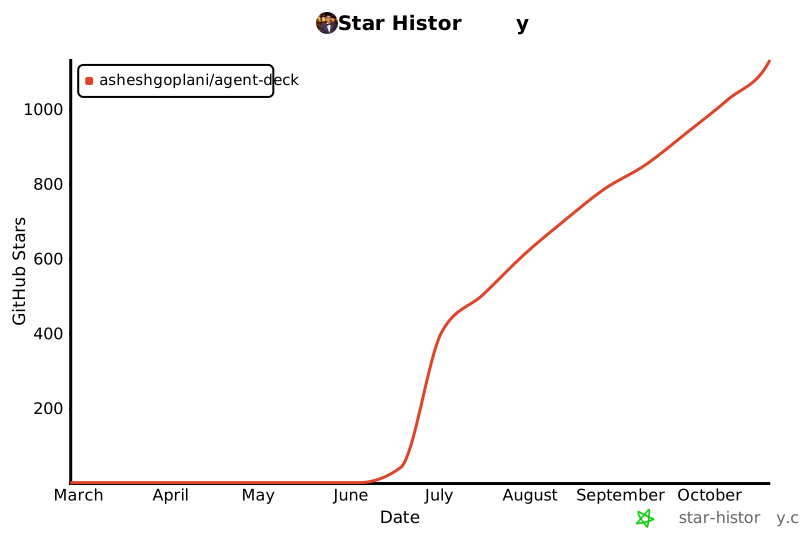](https://star-history.com/#asheshgoplani/agent-deck&Date) ## License MIT License — see [LICENSE](LICENSE) --- <div align="center"> Built with [Bubble Tea](https://github.com/charmbracelet/bubbletea) and [tmux](https://github.com/tmux/tmux) **[Docs](skills/agent-deck/references/) . [Discord](https://discord.gg/e4xSs6NBN8) . [Issues](https://github.com/asheshgoplani/agent-deck/issues) . [Discussions](https://github.com/asheshgoplani/agent-deck/discussions)** </div>
Instalação
Instale a skill a partir de https://github.com/asheshgoplani/agent-deckEsta skill não está publicada no registro do ClawHub. Cole o prompt no seu agente de código — Claude Code, Cursor, Codex — e ele instalará a skill direto do repositório de origem.
Abrir o repositório