Назад к навыкам
mcpm.sh
от pathintegral-institute
Cline—Ещё нет оценок
Ваша оценка
Кратко
CLI MCP package manager & registry for all platforms and all clients. Search & configure MCP servers. Advanced Router & Profile features.
Описание
       English | [简体中文](README.zh-CN.md)  ``` Open Source. Forever Free. Built with ❤️ by Path Integral Institute ``` # 🌟 MCPM - Model Context Protocol Manager MCPM is an open source CLI tool for managing MCP servers. It provides a simplified global configuration approach where you install servers once and organize them with profiles, then integrate them into any MCP client. Features include server discovery through a central registry, direct execution, sharing capabilities, and client integration tools. Demo is showing outdated v1 commands, new demo is baking ...  ## 🤝 Community Contributions > 💡 **Grow the MCP ecosystem!** We welcome contributions to our [MCP Registry](mcp-registry/README.md). Add your own servers, improve documentation, or suggest features. Open source thrives with community participation! ## 🚀 Quick Installation ### Recommended: ```bash curl -sSL https://mcpm.sh/install | bash ``` Or choose [other installation methods](#-other-installation-methods) like `brew`, `pipx`, `uv` etc. ## 🔎 Overview MCPM v2.0 provides a simplified approach to managing MCP servers with a global configuration model. Key features include: - ✨ **Global Server Management**: Install servers once, use everywhere - 📋 **Virtual Profiles**: Organize servers with tags for different workflows - 🔍 **Server Discovery**: Browse and install from the MCP Registry - 🚀 **Direct Execution**: Run servers over stdio or HTTP for testing - 🌐 **Public Sharing**: Share servers through secure tunnels - 🔄 **Server Updates**: Check for and apply updates to git-based, NPX, and binary servers - 🎛️ **Client Integration**: Manage configurations for Claude Desktop, Cursor, Windsurf, and more - 🤖 **AI Agent Friendly**: Non-interactive CLI with comprehensive automation support and [llm.txt](llm.txt) guide - 💻 **Beautiful CLI**: Rich formatting and interactive interfaces - 📊 **Usage Analytics**: Monitor server usage and performance MCPM v2.0 eliminates the complexity of v1's target-based system in favor of a clean global workspace model. ## 🖥️ Supported MCP Clients MCPM will support managing MCP servers for the following clients: - 🤖 Claude Desktop (Anthropic) - ⌨️ Cursor - 🏄 Windsurf - 🧩 Vscode - 📝 Cline - ➡️ Continue - 🦢 Goose - 🔥 5ire - 🦘 Roo Code - 💻 OpenCode - ✨ More clients coming soon... ## 🔥 Command Line Interface (CLI) MCPM provides a comprehensive CLI with a clean, organized interface. The v2.0 architecture uses a global configuration model where servers are installed once and can be organized with profiles, then integrated into specific MCP clients as needed. ### ℹ️ General ```bash mcpm --help # Display help information and available commands mcpm --version # Display the current version of MCPM ``` ### 🌐 Server Management Global server installation and management commands: ```bash # 🔍 Search and Install mcpm search [QUERY] # Search the MCP Registry for available servers mcpm info SERVER_NAME # Display detailed information about a server mcpm install SERVER_NAME # Install a server from registry to global configuration mcpm uninstall SERVER_NAME # Remove a server from global configuration # 📋 List and Inspect mcpm ls # List all installed servers and their profile assignments mcpm edit SERVER_NAME # Edit a server configuration mcpm inspect SERVER_NAME # Launch MCP Inspector to test/debug a server ``` ### 🚀 Server Execution Execute servers directly for testing or integration: ```bash mcpm run SERVER_NAME # Execute a server directly over stdio mcpm run SERVER_NAME --http # Execute a server over HTTP for testing mcpm share SERVER_NAME # Share a server through secure tunnel for remote access mcpm usage # Display comprehensive analytics and usage data ``` ### 📂 Profile Management Profiles are virtual tags that organize servers into logical groups for different workflows: ```bash # 🔄 Profile Operations mcpm profile ls # List all profiles and their tagged servers mcpm profile create PROFILE # Create a new profile mcpm profile rm PROFILE # Remove a profile (servers remain installed) mcpm profile edit PROFILE # Interactive server selection for profile # 🚀 Profile Execution mcpm profile run PROFILE # Execute all servers in a profile over stdio or HTTP mcpm profile share PROFILE # Share all servers in a profile through secure tunnel mcpm profile inspect PROFILE # Launch MCP Inspector for all servers in profile ``` ### 🖥️ Client Integration Manage MCP client configurations (Claude Desktop, Cursor, Windsurf, etc.): ```bash mcpm client ls # List all supported MCP clients and their status mcpm client edit CLIENT_NAME # Interactive server enable/disable for a client mcpm client edit CLIENT_NAME -e # Open client config in external editor mcpm client import CLIENT_NAME # Import server configurations from a client ``` ### 🔄 Server Updates Check for and apply updates to installed MCP servers: ```bash mcpm update # Update all servers mcpm update SERVER_NAME # Update a specific server mcpm update --check # Dry run — check for updates without applying mcpm update --rebase # Use git rebase instead of fast-forward mcpm update --init # Scan servers and populate source metadata mcpm update --init --force # Re-detect all source metadata ``` MCPM tracks where each server came from (git repo, npm package, HTTP remote) and can pull the latest changes automatically. Git-based servers are updated via `git pull --ff-only` by default, with `--rebase` as an opt-in alternative. NPX/UVX servers auto-update at runtime and are shown for informational purposes. ### 🛠️ System & Configuration ```bash mcpm doctor # Check system health and server status mcpm config # Manage MCPM configuration and settings mcpm migrate # Migrate from v1 to v2 configuration ``` ### 📚 Registry The MCP Registry is a central repository of available MCP servers that can be installed using MCPM. The registry is available at [mcpm.sh/registry](https://mcpm.sh/registry). ## 🤖 AI Agent Integration MCPM is designed to be AI agent friendly with comprehensive automation support. Every interactive command has a non-interactive alternative using CLI parameters and environment variables. ### 🔧 Non-Interactive Mode Set environment variables to enable full automation: ```bash export MCPM_NON_INTERACTIVE=true # Disable all interactive prompts export MCPM_FORCE=true # Skip confirmations export MCPM_JSON_OUTPUT=true # JSON output for parsing ``` ### 📋 LLM.txt Guide The [llm.txt](llm.txt) file provides comprehensive documentation specifically designed for AI agents, including: - Complete command reference with parameters and examples - Environment variable usage patterns - Best practices for automation - Error handling and troubleshooting - Batch operation patterns The llm.txt file is automatically generated from the CLI structure and kept up-to-date with each release. ### ⚡ Example Usage #### Use case 1: expose a local stdio server over HTTP 1) Add the server to MCPM ```bash mcpm new [MY_SERVER_NAME] --type stdio --command "[COMMAND]" --args "[ARG_1] [ARG_2] ..." ``` (Add `--force` arg to bypass the confirmation interaction) Verify it appears in your installed servers: ```bash mcpm ls ``` You should see `[MY_SERVER_NAME]` in the list. 2) Serve it over HTTP ```bash mcpm run [MY_SERVER_NAME] --http ``` MCPM prints the server URL, for example: ``` URL: http://127.0.0.1:6276/mcp/ ``` 3) Expose it on your network (optional) ```bash mcpm run [MY_SERVER_NAME] --http --host 0.0.0.0 ``` Tip: add `--port <PORT>` to choose a different port. #### Use case 2: combine multiple servers and serve them as one profile 1) Add the servers to MCPM ```bash # Stdio server mcpm new [SERVER_A] --type stdio --command "[COMMAND]" --args "[ARG_1] [ARG_2] ..." --force # Remote HTTP/SSE server mcpm new [SERVER_B] --type remote --url "http://SERVER_ADDR/mcp/" --force ``` 2) Create a profile and add the servers Interactive: ```bash mcpm profile create [PROFILE_NAME] mcpm profile edit [PROFILE_NAME] ``` MCPM would list out all installed servers, you can use arrows to navigate, space to select/deselect, type to search, and Enter to confirm. Verify: ```bash mcpm profile ls ``` You should see your profile with the selected servers. 3) Run the profile ```bash # Stdio mcpm profile run [PROFILE_NAME] # HTTP mcpm profile run [PROFILE_NAME] --http # Optional: host and port mcpm profile run [PROFILE_NAME] --http --host 0.0.0.0 --port 8080 ``` #### Other common usage ```bash # Server management mcpm new myserver --type stdio --command "python -m server" --force mcpm edit myserver --env "API_KEY=secret" --force # Profile management mcpm profile edit web-dev --add-server myserver --force mcpm profile run web-dev --port 8080 # Client integration mcpm client edit cursor --add-profile web-dev --force ``` ## 🗺️ Roadmap ### ✅ v2.0 Complete - [x] Global server configuration model - [x] Profile-based server tagging and organization - [x] Interactive command interfaces - [x] Client integration management (`mcpm client edit`) - [x] Modern CLI with consistent UX - [x] Registry integration and server discovery - [x] Direct server execution and sharing - [x] Import from existing client configurations - [x] Additional client support (gemini-cli, codex, etc.) ### 🔮 Future Enhancements - [x] Server update management (`mcpm update`) - [ ] GitHub release binary updates (download + replace) - [ ] Advanced Server access monitoring and analytics - [ ] Execution in docker - [ ] Expose MCPM functionality as an MCP server (search, install, profile management etc.) - [ ] TUI interface for MCP inspect - [ ] TUI interface for MCP & profile management ## 📦 Other Installation Methods ### 🍺 Homebrew ```bash brew install mcpm ``` ### 📦 pipx (Recommended for Python tools) ```bash pipx install mcpm ``` ### 🪄 uv tool ```bash uv tool install mcpm ``` ## More Installation Methods ### 🐍 pip ```bash pip install mcpm ``` ### 🧰 X-CMD If you are a user of [x-cmd](https://x-cmd.com), you can run: ```sh x install mcpm.sh ``` ## 👨💻 Development This repository contains the CLI and service components for MCP Manager, built with Python and Click following modern package development practices. ### 📋 Development Requirements - 🐍 Python 3.10+ - 🚀 uv (for virtual environment and dependency management) - 🖱️ Click framework for CLI - ✨ Rich for enhanced console output - 🌐 Requests for API interactions ### 📁 Project Structure The project follows the modern src-based layout: ``` mcpm.sh/ ├── src/ # Source package directory │ └── mcpm/ # Main package code ├── tests/ # Test directory ├── test_cli.py # Development CLI runner ├── pyproject.toml # Project configuration ├── pages/ # Website content │ └── registry/ # Registry website ├── mcp-registry/ # MCP Registry data └── README.md # Documentation ``` ### 🚀 Development Setup 1. Clone the repository ``` git clone https://github.com/pathintegral-institute/mcpm.sh.git cd mcpm.sh ``` 2. Set up a virtual environment with uv ``` uv venv --seed source .venv/bin/activate # On Unix/Mac ``` 3. Install dependencies in development mode ``` uv pip install -e . ``` 4. Run the CLI directly during development ``` # Either use the installed package mcpm --help # Or use the development script ./test_cli.py --help ``` 5. Run tests ``` pytest tests/ ``` ### ✅ Best Practices - 📁 Use the src-based directory structure to prevent import confusion - 🔧 Develop with an editable install using `uv pip install -e .` - 🧩 Keep commands modular in the `src/mcpm/commands/` directory - 🧪 Add tests for new functionality in the `tests/` directory - 💻 Use the `test_cli.py` script for quick development testing ### 🔢 Version Management MCP uses a single source of truth pattern for version management to ensure consistency across all components. #### 🏷️ Version Structure - 📍 The canonical version is defined in `version.py` at the project root - 📥 `src/mcpm/__init__.py` imports this version - 📄 `pyproject.toml` uses dynamic versioning to read from `version.py` - 🏷️ Git tags are created with the same version number prefixed with 'v' (e.g., v1.0.0) #### 🔄 Updating the Version When releasing a new version: 1. Use the provided version bump script ``` ./bump_version.sh NEW_VERSION # Example: ./bump_version.sh 1.1.0 ``` 2. Push the changes and tags ``` git push && git push --tags ``` 3. Create a GitHub release matching the new version This process ensures that the version is consistent in all places: code, package metadata, and git tags. PyPI release is handled by the CI/CD pipeline and will be triggered automatically. ## 📜 License MIT ## Star History [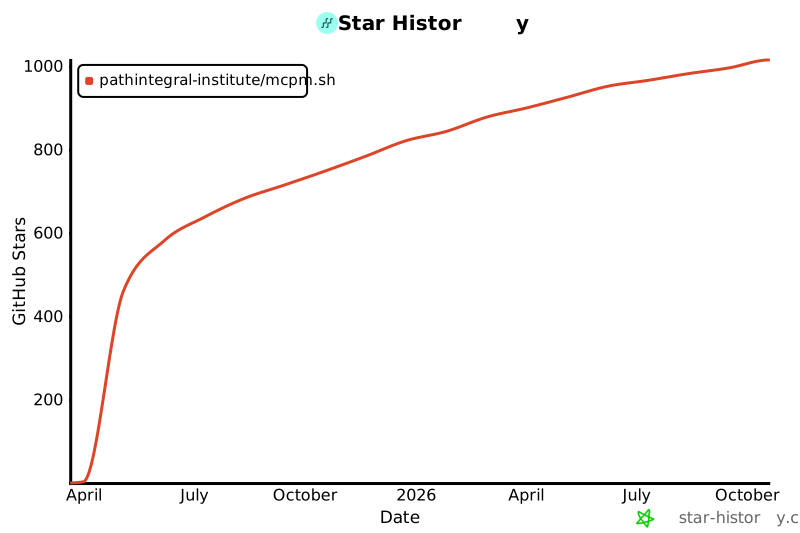](https://www.star-history.com/#pathintegral-institute/mcpm.sh&Date)
Установка
Установи навык из https://github.com/pathintegral-institute/mcpm.shЭтот навык не опубликован в реестре ClawHub. Вставьте промпт в кодинг-агент — Claude Code, Cursor, Codex — и он установит навык прямо из исходного репозитория.
Открыть репозиторий